Why does llms.txt matter for a Shopify store?
An llms.txt is a plain-text file at the root of your domain, written in Markdown, that tells AI systems what a site is about and where the important pages are. The idea comes from the llms.txt proposal (2024): language models have a small context window, so give them a curated table of contents instead of making them crawl everything.
Two honest caveats before we go on. First, llms.txt is a young standard. No major AI provider has published a commitment to read it, and there is no public evidence that ChatGPT, Claude or Perplexity rank a store higher because of it. Second, llms.txt doesn’t control access. Whether an AI crawler may read your store is decided by robots.txt, nothing else (Tante-E, Aug 2026).
So why bother? Because the file is cheap, it can’t hurt, and when an assistant does fetch it, a clear overview beats a 404. Think of it like a sitemap in 2006: not every crawler used it, and the ones that did were the ones you wanted.
What is in Shopify’s default llms.txt?
Open your store’s /llms.txt in a browser. Since the week of 8 May 2026, Shopify serves one on every store without a changelog entry (Shopify developer forum). On 20 May, Shopify staff confirmed that /agents.md is now the primary discovery file and /llms.txt mirrors it.
Here is what the file contains on a live store on 31 Oct 2026 (allbirds.com/llms.txt, structure identical on every default store):
- Agent Instructions with the store name and URL
- A recommendation to use the Shop skill (
shop.app/SKILL.md) for discovery and checkout - UCP integration: the
/.well-known/ucpprofile and the MCP endpoint at/api/ucp/mcp - Browser integration via WebMCP tools on the storefront and checkout
- Interaction guidelines: buyer authorization, agent identification (Web Bot Auth), rate limits, buyer country and currency
- Read-only browsing: a pointer to
/sitemap.xml,/products/{handle}and/collections/all - Links to your four policy pages (privacy, terms, refund, shipping)
- A Platform section about Shopify, with a link to start your own store
What’s not in it: your store description, your collections by name, any product, any blog post, any page. /llms-full.txt is the same text. The file is written for a shopping agent that wants to add to cart and check out. It is not written for an AI assistant that a customer asks “where can I buy a good cast-iron pan in Germany?”
The default has one more limit worth knowing: it’s served only at your bare primary domain, with no localized version for Shopify Markets subfolders (shopify.dev).
Do I need to do anything?
For a single-currency, single-language store with a tidy catalog, Shopify’s default is fine for agents, and you lose nothing by leaving it. You gain something only if you want AI assistants to see a curated description of your store: what you sell, your main collections, your guides and FAQ, your policies.
A quick way to decide: ask ChatGPT or Perplexity a question your best customer would ask, and see whether your store comes up. If it does, your product pages and structured data are already doing the work. If it doesn’t, an llms.txt is one of several cheap fixes, next to rich snippets (structured data helps AI systems identify your products, prices and store; Easy Rich Snippets for SEO adds it without code) and an AI-friendly robots.txt.
The three ways to add a real llms.txt to Shopify
Shopify looks for the file in this order: templates/llms.txt.liquid in your theme, then templates/agents.md.liquid, then its own default (shopify.dev).
1. Leave the default
Who it suits: stores that only care about agentic checkout, or that don’t want to maintain a file. Cost: nothing. What you get: agent instructions, no store overview.
2. Write templates/llms.txt.liquid by hand
In the Shopify admin: Online Store → Themes → ⋯ → Edit code → right-click the Templates folder → New File → name it llms.txt.liquid. Paste Markdown. Shopify renders it at /llms.txt.
Two things catch people here. The template only knows the request and agents objects. shop, collections, articles and products are not available, so you cannot loop over your catalog in Liquid; everything beyond the agent metadata is static text you type (shopify.dev). And the file lives in the theme: switch or re-install a theme and it’s gone.
A sensible hand-written file is short. Store description in two sentences, your 5–10 main collections with one line each, your best guides or FAQ, your policies, a contact. The most common mistake is pasting every product; an overloaded file buries the pages you want cited.
Who it suits: small catalogs that rarely change, and owners who like editing theme files. Cost: free, plus your time every time a collection changes.
3. Let an app generate and update it
An app reads your live catalog, writes a curated file (products, collections, blog posts, pages) and rewrites it on a schedule, so it stays current when products, prices or stock change. You choose what goes in; the app does the typing.
Who it suits: stores with a changing catalog, more than one person touching the theme, or no wish to think about this again. Cost: from $1.99/month for Ahoi Apps: LLMs.txt Generator, 30-day free trial. Other apps on the App Store do the same at higher prices; compare before you install.
What Ahoi Apps: LLMs.txt Generator does
Ahoi Apps: LLMs.txt Generator builds the overview that Shopify’s default leaves out:
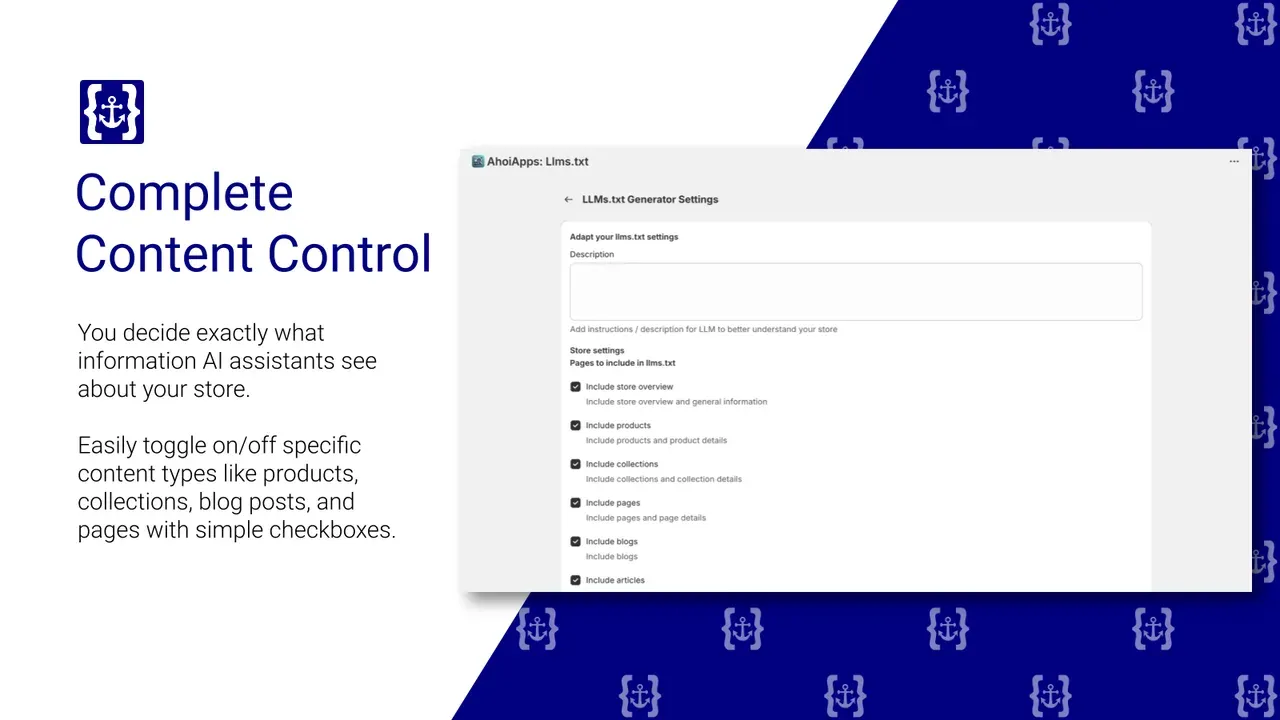
- One click. Generate the file from your products, collections, blog posts and pages. Sold-out products and empty collections are left out.
- You choose what AI sees. Untick products, blogs or pages you don’t want listed. Curated beats complete.
- Stays current. The app re-syncs every 12 hours, and you can sync by hand after a big catalog change.
- Crawler control. Allow or block AI crawlers from the same screen. Our advice on which ones is in the next section.
From $1.99/month, 30-day free trial.
Allow or block AI crawlers?
llms.txt describes; robots.txt decides. Shopify’s default robots.txt lets AI crawlers in (Tante-E), and in 2025 Shopify added a note to it saying automated “buy-for-me” flows without a human review step are not permitted (inFlow). That note doesn’t block crawlers.
There are two kinds of AI bots, and they deserve two decisions:
| Bot | Operator | What it does | If you block it |
|---|---|---|---|
| OAI-SearchBot, ChatGPT-User | OpenAI | Fetches pages to answer a user’s question | Your store can’t appear in ChatGPT answers |
| PerplexityBot | Perplexity | Same, for Perplexity | Same, for Perplexity |
| Google-Extended | Gemini and AI features | Your store may drop out of Google’s AI answers | |
| GPTBot | OpenAI | Collects training data | No effect on answers today |
| ClaudeBot | Anthropic | Collects training data | No effect on answers today |
| CCBot | Common Crawl | Public dataset used for training | No effect on answers today |
Source: Tante-E, Aug 2026. Bot names change; check the provider’s own documentation before you copy a rule.
If you want AI visibility, keep the first three rows open. Blocking training bots is a legitimate choice; just make it bot by bot, never with one rule for everything “AI”. The stores that lose the most are the ones that copy a blanket block from a forum and vanish from ChatGPT without noticing.
Mistakes to avoid
- Thinking llms.txt blocks anything. It can’t. Access is
robots.txt. - Listing the whole catalog. 2,000 product lines bury your five collections. Curate.
- Forgetting it’s in the theme. A theme switch deletes a hand-written template. Check after every theme change, or let an app rewrite it.
- Expecting rankings. No AI provider has promised to read the file. Treat it as a cheap, tidy extra, not a strategy.
- Checking only
robots.txt. A firewall or bot protection in front of your store can still return 403 to a crawler. Test the live response. - Hiding pages in llms.txt but not from Google. If a page shouldn’t be found at all, set it to noindex and keep it out of the sitemap. Easy Sitemap Builder for SEO sets NoIndex per page, without code.